Monday, April 6, 2026

2026 Cloud Security Checklist for Regulated SMBs

What cloud security steps should regulated SMBs follow in 2026?

Regulated small and mid-sized businesses must secure cloud systems with strong access controls, encryption, monitoring, and compliance-ready policies. A clear security checklist helps protect sensitive data and ensures organizations remain aligned with regulatory standards.

Why is cloud security critical for regulated businesses?

Businesses handling sensitive data—such as healthcare records, financial information, or government data—must meet strict cybersecurity requirements. Without proper cloud security controls, organizations risk data breaches, compliance violations, and operational disruption.

How can SMBs simplify cloud security compliance?

By following a structured cloud security checklist that includes identity protection, data encryption, monitoring, and employee training. When implemented correctly, these safeguards help businesses maintain strong security and regulatory readiness.

Why Cloud Security Is a Top Priority for Regulated SMBs

Cloud platforms have become the backbone of modern business operations. From file storage and collaboration platforms to accounting software and customer data systems, many critical workloads now run in the cloud.

While cloud solutions offer flexibility and scalability, they also introduce new security responsibilities.

Regulated industries—including healthcare, financial services, aerospace, and government contractors—must ensure that sensitive information remains protected in cloud environments.

Many organizations handling regulated data must follow strict cybersecurity frameworks. For example, businesses handling Controlled Unclassified Information must comply with NIST SP 800-171 security controls, which include strict requirements around access management, monitoring, and data protection.

For SMBs, maintaining compliance while managing cloud infrastructure can feel overwhelming without a clear security strategy.

A Practical 2026 Cloud Security Checklist for SMBs

A Practical 2026 Cloud Security Checklist for SMBs

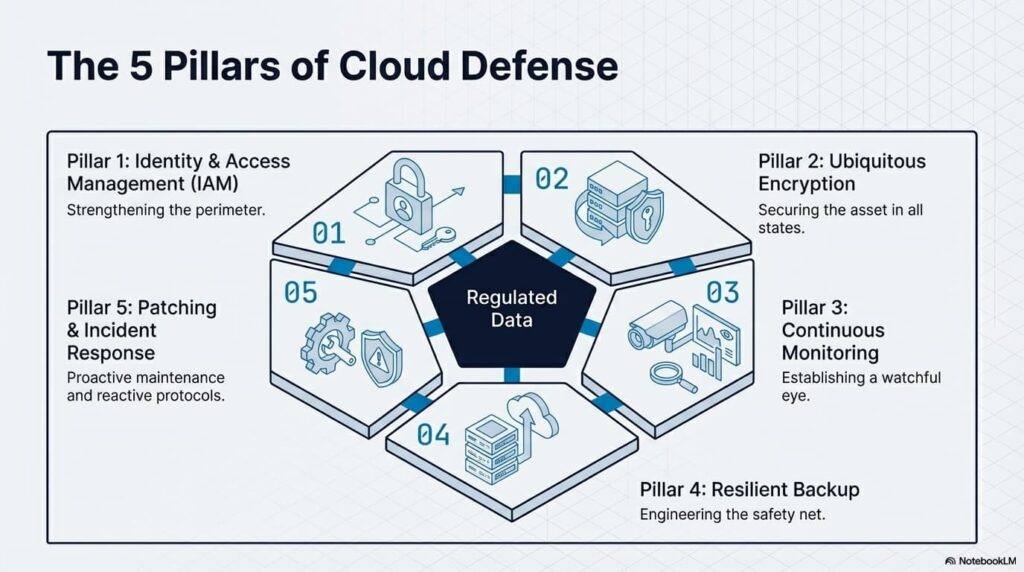
A strong cloud security posture begins with a structured set of controls designed to protect sensitive data and maintain compliance.

Below are essential steps regulated SMBs should implement when securing their cloud environments.

Strengthen Identity and Access Management

Access control is one of the most critical aspects of cloud security.

Organizations should ensure that only authorized users can access sensitive systems and data.

Best practices include:

• Enforcing multi-factor authentication for all users

• Limiting administrative privileges

• Implementing role-based access controls

• Regularly reviewing user access permissions

• Removing access immediately when employees leave the organization

These controls significantly reduce the risk of unauthorized access.

Encrypt Sensitive Data Everywhere

Encryption protects sensitive information both while it is stored and when it is transmitted between systems.

Most regulatory frameworks require encryption as a core security control.

Key encryption practices include:

• Encrypting sensitive data stored in cloud systems

• Using secure connections for data transfers

• Protecting backup files with encryption

• Managing encryption keys securely

Encryption helps ensure that even if data is intercepted or accessed improperly, it remains unreadable.

Monitor Cloud Activity Continuously

Visibility is essential for identifying suspicious behavior before it becomes a major incident.

Cloud monitoring tools help organizations detect unusual activity, failed login attempts, or unauthorized changes.

Security monitoring should include:

• Continuous system logging

• Alerts for suspicious login attempts

• Monitoring file access and downloads

• Tracking administrative actions

Regular monitoring allows organizations to respond quickly to potential threats.

Implement Secure Backup and Recovery Systems

Cloud systems still require reliable backup strategies.

Accidental deletions, ransomware attacks, or system failures can disrupt business operations if data is not recoverable.

Organizations should maintain:

• Automated cloud backups

• Secure off-site backup storage

• Regular backup testing

• Clearly documented recovery procedures

Reliable backups ensure business continuity during unexpected events.

Maintain Patch and Update Management

Outdated software remains one of the most common causes of cybersecurity vulnerabilities.

Cloud-based applications and systems must be updated regularly to protect against emerging threats.

Organizations should:

• Apply security patches promptly

• Monitor vendor updates and security advisories

• Automate patch management when possible

• Maintain documentation of system updates

Regular patching helps close security gaps before attackers can exploit them.

Develop a Cloud Incident Response Plan

Even the most secure organizations must be prepared to respond to cybersecurity incidents.

A clear incident response plan ensures teams know how to act quickly when suspicious activity occurs.

Incident response planning should include:

• Defined reporting procedures

• Clear escalation paths

• Data breach response protocols

• Communication guidelines during incidents

Organizations with documented response plans recover faster and minimize disruption.

Compliance Frameworks Driving Cloud Security Requirements

Regulated SMBs must often align with multiple cybersecurity frameworks depending on their industry.

For example, government contractors and organizations handling sensitive federal information may need to follow requirements such as:

• FAR cybersecurity controls

• NIST SP 800-171

• CMMC certification requirements

• DFARS regulations

These frameworks require strong access controls, system monitoring, encryption, and incident response planning.

For regulated SMBs, aligning cloud security practices with these frameworks is essential for maintaining contracts and regulatory standing.

Why Businesses Partner with HD Tech for Cloud Security

Many SMBs rely on experienced IT partners to manage the complexity of cloud infrastructure and security compliance.

HD Tech helps organizations secure cloud environments while ensuring systems remain reliable and easy to manage.

Based in Orange County, California and serving businesses across the United States, HD Tech supports organizations that depend on secure technology and responsive IT support.

Businesses working with HD Tech benefit from:

• Proactive cloud security monitoring

• Help desk support for cloud-based systems

• Guidance navigating complex compliance requirements

• Strong data protection strategies

• Reliable backup and recovery planning

By combining proactive IT support with strong cybersecurity practices, organizations can protect sensitive data while maintaining operational efficiency.

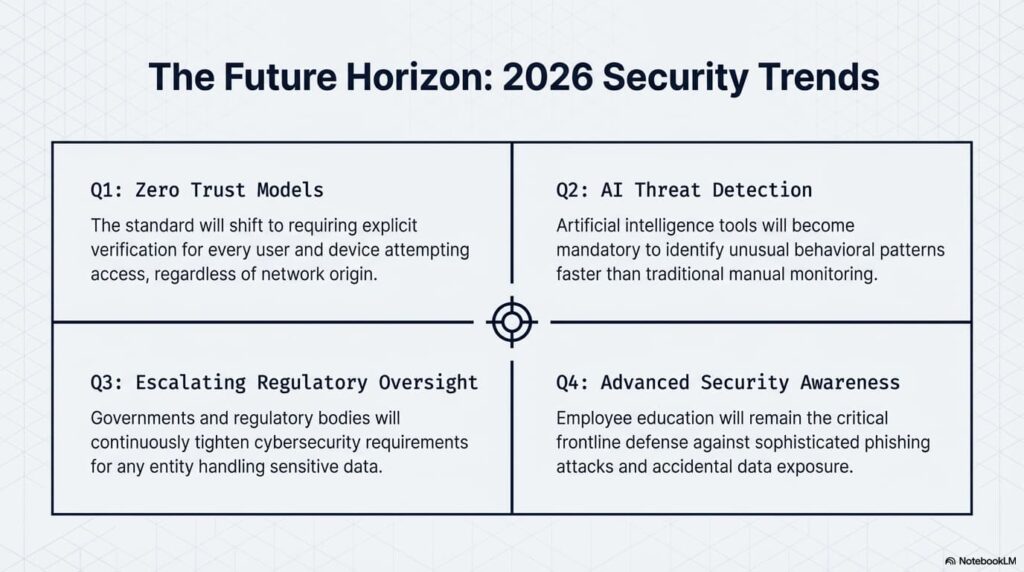
The Future of Cloud Security for SMBs

The Future of Cloud Security for SMBs

As cloud adoption continues to grow, security strategies will continue evolving.

Key trends expected in the coming years include:

Zero Trust Security Models

Organizations will increasingly require verification for every user and device attempting to access cloud systems.

Automated Threat Detection

Artificial intelligence tools will help identify unusual behavior faster than traditional monitoring systems.

Greater Regulatory Oversight

Governments and regulatory bodies will continue strengthening cybersecurity requirements for organizations handling sensitive data.

Improved Security Awareness Training

Employee education will remain a critical part of preventing phishing attacks and data exposure.

For regulated SMBs, cloud security will remain a critical part of protecting business operations and maintaining compliance.

Frequently Asked Questions About Cloud Security for SMBs

What is cloud security for small businesses?

Cloud security refers to the policies, tools, and practices used to protect data and systems hosted in cloud environments. This includes access control, encryption, monitoring, and backup strategies designed to keep sensitive information secure.

Why do regulated SMBs need stronger cloud security?

Organizations in regulated industries often store sensitive data such as financial records, healthcare information, or government-related data. Security controls help protect this information and ensure businesses remain compliant with regulatory standards.

Is cloud storage secure for regulated data?

Cloud platforms can be very secure when configured correctly. However, organizations must implement strong access controls, encryption, monitoring, and security policies to ensure sensitive information remains protected.

How often should cloud security be reviewed?

Cloud security configurations should be reviewed regularly, especially when systems change, new users are added, or regulatory requirements evolve. Periodic assessments help identify vulnerabilities and maintain compliance.

What is the biggest cloud security risk for SMBs?

One of the most common risks is misconfigured access controls, which can allow unauthorized users to access sensitive data. Proper identity management and regular access reviews help prevent this issue.

Protect Your Cloud Systems with Trusted IT Support

Cloud systems power many of today’s most important business operations. Keeping those systems secure is essential for protecting data, maintaining compliance, and ensuring business continuity.

HD Tech helps organizations implement secure cloud environments, proactive monitoring, and reliable IT support that keeps systems running smoothly.

If your business wants stronger cloud security and dependable technology support, the team at HD Tech is ready to help.

Call 877-540-1684 to speak with an IT specialist and learn how secure cloud infrastructure can support your organization’s growth.

Areas Served

HD Tech is headquartered in Orange County, California, supporting businesses across Irvine, Anaheim, Santa Ana, Huntington Beach, Newport Beach, and surrounding communities while providing IT and cybersecurity services nationwide across the United States.

The post 2026 Cloud Security Checklist for Regulated SMBs first appeared on HD Tech.


source https://hdtech.com/2026-cloud-security-checklist-for-regulated-smbs/

Monday, March 30, 2026

How CFOs Can Evaluate IT ROI More Effectively in 2026

How should CFOs measure the return on IT investments in 2026?

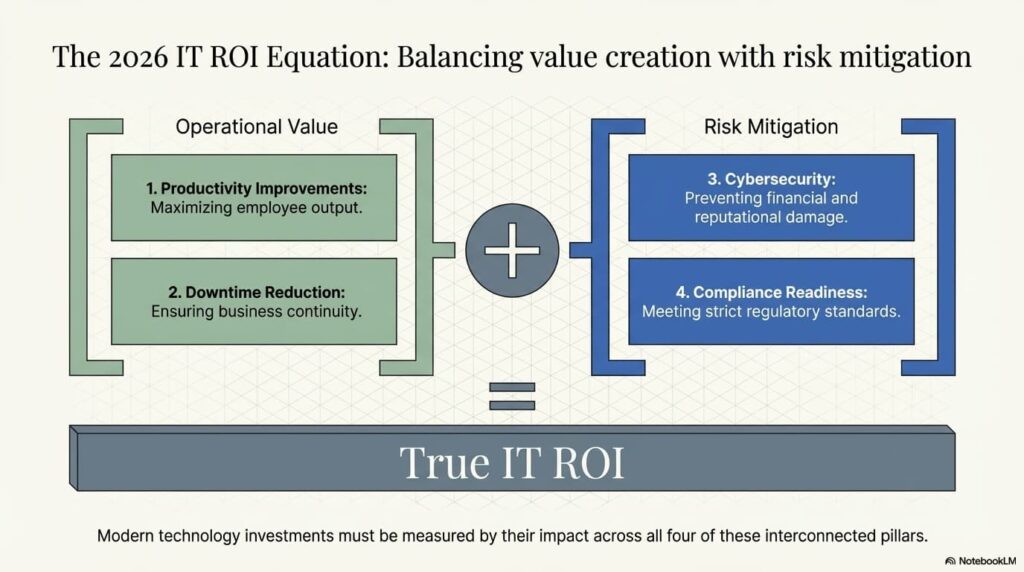
In 2026, CFOs evaluate IT ROI by looking beyond hardware and software costs. Modern technology investments should be measured by their impact on productivity, cybersecurity risk reduction, operational efficiency, and business continuity.

Why is measuring IT ROI more complex today?

Technology now supports nearly every part of business operations—from cybersecurity and cloud infrastructure to remote work and compliance. Because IT affects productivity, risk management, and revenue protection, CFOs must evaluate both financial returns and operational benefits.

What should financial leaders expect from IT investments?

CFOs should expect measurable improvements in efficiency, reduced downtime, stronger cybersecurity protection, and scalable infrastructure that supports business growth.

The CFO’s Expanding Role in Technology Decisions

Over the last decade, the role of the Chief Financial Officer has expanded beyond budgeting and financial reporting. CFOs are now key decision-makers in technology strategy.

This shift happened because IT spending has grown significantly across nearly every industry. Cloud services, cybersecurity solutions, compliance systems, and remote work infrastructure now represent major operational investments.

Financial leaders must evaluate whether these investments truly support the organization’s long-term goals.

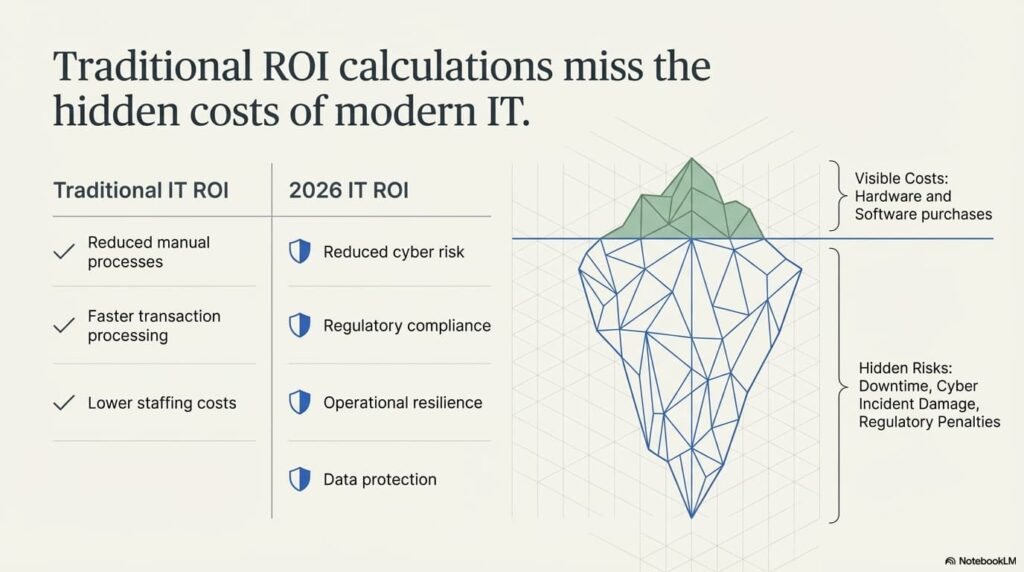
The challenge is that traditional ROI calculations do not always capture the full value of modern IT services.

Why Traditional IT ROI Calculations Fall Short

Traditional IT ROI Calculations

Historically, IT ROI was calculated by comparing the cost of technology against measurable productivity gains.

For example:

• Reduced manual processes

• Faster transaction processing

• Lower staffing costs

While these metrics still matter, modern IT delivers value in additional ways that are harder to quantify but critically important.

Examples include:

• Reduced cybersecurity risk

• Improved regulatory compliance

• Greater operational resilience

• Protection of sensitive business data

When evaluating technology investments in 2026, CFOs must include both financial returns and risk mitigation benefits.

Key Metrics CFOs Should Track for IT ROI

Key Metrics CFOs Should Track for IT ROI

Forward-thinking financial leaders track several performance indicators when evaluating technology investments.

Productivity Improvements

Modern IT infrastructure helps employees work faster and more efficiently.

Indicators include:

• Faster system performance

• Reduced IT support requests

• Improved collaboration tools

• Faster onboarding for new employees

When employees spend less time dealing with technology problems, productivity increases across the organization.

Downtime Reduction

System outages can disrupt operations, delay projects, and impact customer service.

Monitoring downtime metrics helps CFOs understand the value of proactive IT management.

Key indicators include:

• Frequency of system outages

• Average resolution time for technical issues

• Business hours affected by downtime

Reducing downtime protects revenue and keeps operations running smoothly.

Cybersecurity Risk Reduction

Cybersecurity incidents can cause major financial damage, including regulatory penalties, operational disruptions, and reputational harm.

Investments in security tools, monitoring, and employee training significantly reduce this risk.

Many organizations now evaluate IT ROI partly based on how well their systems prevent cyber incidents.

Compliance and Regulatory Readiness

Organizations handling regulated data must meet strict cybersecurity and privacy requirements.

Compliance frameworks often require:

• Access controls

• Audit logging

• Incident response procedures

• Encryption for sensitive data

These controls help organizations maintain regulatory compliance and protect sensitive information.

Businesses working with government agencies or defense contracts, for example, may need to follow cybersecurity standards such as NIST SP 800-171 and CMMC certification requirements.

Maintaining compliance reduces legal risk and protects business relationships.

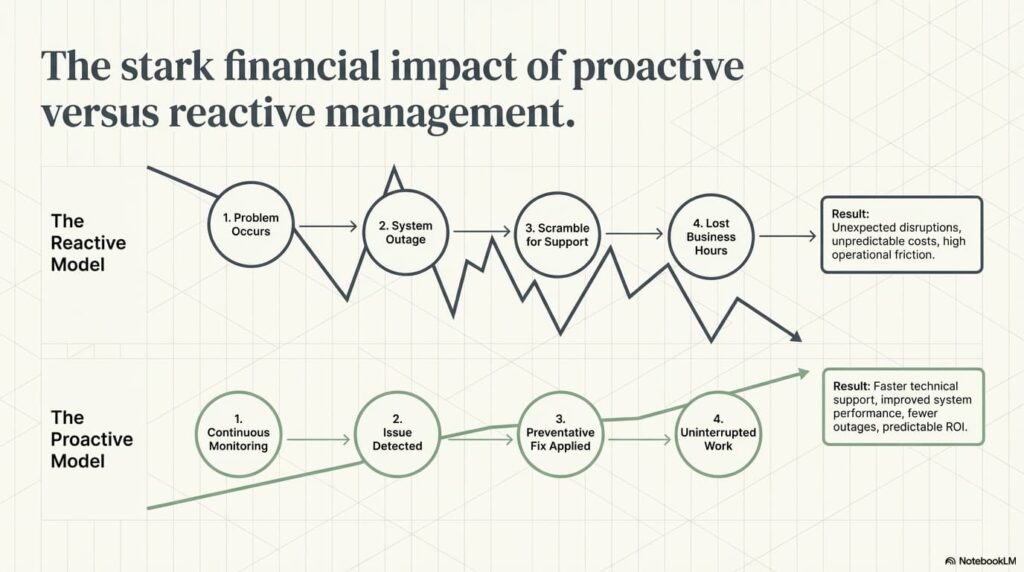
The Financial Impact of Proactive IT Management

Proactive IT Management

Many CFOs are shifting toward managed IT services because proactive support often delivers stronger ROI than reactive IT models.

Instead of fixing problems after they occur, proactive IT management focuses on prevention.

Benefits include:

• Fewer system outages

• Faster technical support

• Improved system performance

• Better cybersecurity monitoring

This approach reduces unexpected disruptions and improves operational stability.

How CFOs Can Align IT Investments with Business Strategy

One of the most effective ways to evaluate IT ROI is by aligning technology decisions with business objectives.

CFOs should ask several strategic questions when reviewing technology investments.

Does the Technology Improve Operational Efficiency?

Technology should simplify processes, automate repetitive tasks, and improve collaboration between teams.

Does the Investment Reduce Business Risk?

Cybersecurity tools, backup systems, and monitoring platforms protect the organization from operational disruptions.

Does the Solution Support Growth?

Scalable infrastructure allows companies to expand operations without constantly replacing systems.

Does the Technology Improve Employee Productivity?

Systems that work smoothly allow employees to focus on business priorities rather than technical issues.

When IT investments align with these goals, their value becomes much easier to measure.

Why Businesses Partner with HD Tech for Strategic IT Support

HD Tech works with organizations that want technology to support business growth, operational efficiency, and security.

Based in Orange County, California and supporting companies throughout the United States, HD Tech provides proactive IT services designed to reduce downtime and strengthen cybersecurity.

Organizations benefit from:

• Responsive help desk support

• Proactive system monitoring

• Cybersecurity awareness and protection

• Scalable IT infrastructure

• Guidance on technology strategy

By aligning IT support with business objectives, companies can gain measurable value from their technology investments.

The Future of IT ROI Evaluation

As technology continues to evolve, CFOs will play an even larger role in IT strategy.

Future IT ROI evaluations will likely focus on:

Business Continuity and Resilience

Organizations are prioritizing systems that keep operations running during disruptions.

Security and Risk Management

Cybersecurity investments will continue to be evaluated as risk reduction tools.

Data-Driven Decision Making

Analytics tools will help organizations measure productivity improvements and operational efficiency more accurately.

Strategic Technology Partnerships

Many companies will rely on experienced IT partners to guide long-term technology planning.

For financial leaders, the goal is clear: ensure technology investments deliver measurable value while protecting the organization from operational and security risks.

Frequently Asked Questions About IT ROI for CFOs

What does IT ROI mean for financial leaders?

IT ROI refers to the measurable value an organization receives from its technology investments. This includes productivity improvements, operational efficiency, reduced downtime, stronger cybersecurity, and improved compliance with industry regulations.

How can CFOs measure the financial impact of IT investments?

CFOs often track metrics such as downtime reduction, system performance improvements, employee productivity gains, and security incident prevention. These indicators help financial leaders determine whether technology investments support long-term business goals.

Why is cybersecurity considered part of IT ROI?

Cybersecurity protects organizations from financial losses caused by cyberattacks, data breaches, and operational disruptions. Preventing incidents helps avoid costly downtime, regulatory penalties, and reputational damage.

Should CFOs be involved in IT decision-making?

Yes. Technology investments now affect nearly every part of business operations. CFOs help ensure technology spending aligns with financial strategy and delivers measurable value for the organization.

Can outsourced IT services improve IT ROI?

Many organizations find that managed IT services improve ROI by providing proactive monitoring, experienced technical support, and scalable infrastructure without the overhead of building a large internal IT department.

Make Technology Investments Work Smarter for Your Business

Technology should support productivity, security, and business growth—not create unnecessary complexity.

HD Tech helps organizations implement reliable IT systems, strengthen cybersecurity, and ensure technology investments deliver real business value.

To learn how strategic IT support can improve operational efficiency and reduce technology risks, contact HD Tech today.

Call 877-540-1684 to speak with an IT specialist and explore smarter technology solutions for your organization.

Areas ServedHD Tech is headquartered in Orange County, California, serving businesses in Irvine, Anaheim, Santa Ana, Newport Beach, Huntington Beach, and surrounding communities while providing IT and cybersecurity services nationwide across the United States.

The post How CFOs Can Evaluate IT ROI More Effectively in 2026 first appeared on HD Tech.


source https://hdtech.com/how-cfos-can-evaluate-it-roi-more-effectively-in-2026/

Tuesday, March 24, 2026

The Real Cost of IT Downtime in 2026: What SMBs Need to Understand

By Tom Hermstad | President, HD Tech | 30+ Years in IT Security
322 Main St #4, Seal Beach, CA 90740 | 877-540-1684
Last updated: March 2026


The Real Cost of IT Downtime in 2026: What SMBs Need to Understand

IT downtime is not just an inconvenience — it is one of the most expensive problems a small or mid-sized business can face. Datto’s 2023 research found that the average cost of downtime for SMBs is $8,000 per hour, and Gartner pegs the broader average at $5,600 per minute for network downtime. Yet most business owners in Orange County and Los Angeles have never calculated what a single hour of downtime actually costs their specific company. This guide breaks down the real numbers, shows you how to calculate your own exposure, and explains exactly what separates businesses that recover in minutes from those that lose hundreds of thousands of dollars.

How Much Does IT Downtime Cost Per Minute?

IT downtime costs between $93 and $9,000 per minute depending on company size, industry, and the type of outage. Gartner’s widely cited figure is $5,600 per minute as a cross-industry average. The Ponemon Institute puts the number at $9,000 per minute for mid-sized businesses specifically.

These numbers sound extreme until you break them down. A 50-person company with an average salary of $80,000 per year pays $38.46 per hour per employee. When systems go down and all 50 employees cannot work, that is $1,923 per hour in labor costs alone — before you factor in lost revenue, recovery expenses, customer churn, or emergency vendor fees. ITIC’s 2024 survey found that 91% of mid-sized enterprises report that a single hour of downtime costs their organization $300,000 or more. For smaller businesses the dollar figure is lower, but the impact relative to revenue is often more devastating. A $500,000-per-year company losing $2,000 every hour of downtime feels that loss far more acutely than a Fortune 500 company absorbing millions.

What Is the Real Cost of Downtime for Small Businesses?

The real cost of downtime for small businesses ranges from $2,000 to $10,000 per hour when you include labor, lost revenue, recovery costs, and reputation damage. Datto’s 2023 State of the Channel Ransomware Report found that SMBs pay an average of $8,000 per hour during downtime events — and most experience multiple events per year.

Small businesses get hit harder than large enterprises for a simple reason: they lack redundancy. When a 15-person accounting firm in Seal Beach loses its server during tax season, there is no backup data center to fail over to, no secondary internet connection to switch to, and no in-house IT team to troubleshoot at 2 AM. They call a break-fix technician who charges emergency rates — typically two to three times normal hourly fees — and they wait. Meanwhile, every employee sits idle, every client deadline slides, and every hour that passes erodes client trust that took years to build. The companies that survive downtime without catastrophic losses are the ones that invested in monitoring, redundancy, and documented disaster recovery before the outage happened — not after.

Can IT Downtime Be Prevented?

Most IT downtime is preventable. Hardware failures, ransomware attacks, human error, patch failures, and ISP outages — the five most common causes of downtime for SMBs — can all be mitigated or eliminated entirely with proactive monitoring, tested backups, redundant systems, and staff training.

The distinction is between reactive and proactive IT management. A reactive approach means you wait for something to break and then scramble to fix it. A proactive approach means your systems are monitored 24/7, anomalies are flagged before they become outages, backups are tested regularly so you know they actually work, patches are tested in a staging environment before deployment to production, and your internet connectivity has a failover path. Coveware’s research shows that the median recovery time from a ransomware attack is 24 days — but organizations with proper endpoint detection and response, security operations center monitoring, and tested backup and disaster recovery plans can reduce that to hours. The question is not whether downtime will happen. The question is whether you have built the infrastructure to make it a minor disruption or a business-ending event.


The Complete Guide to IT Downtime Costs for Small and Mid-Sized Businesses

I have been managing IT infrastructure for businesses across Orange County and Los Angeles since 1995. In thirty years, I have watched companies survive outages with barely a hiccup, and I have watched companies nearly go under because they did not know their server backup had been failing silently for six months. The difference between those two outcomes is never luck. It is preparation.

This guide exists because the page you are reading used to be a surface-level overview. That is not good enough for a topic this important. If you are a business owner, office manager, or operations leader at a company with 10 to 200 employees, this is the most thorough breakdown of downtime costs, causes, hidden expenses, and prevention strategies you will find anywhere. Every number cited here comes from a named source. Every recommendation comes from three decades of real-world experience keeping businesses running.

The Downtime Numbers Every Business Owner Should Know

Before we get into causes and prevention, let us establish the baseline. These are the most widely cited and methodologically sound downtime cost studies available as of 2026:

  • Gartner: Average cost of network downtime is $5,600 per minute ($336,000 per hour) across industries
  • Ponemon Institute: Average cost of downtime for mid-sized businesses is $9,000 per minute
  • ITIC 2024 Hourly Cost of Downtime Survey: 91% of mid-sized enterprises say one hour of downtime costs $300,000 or more
  • Datto 2023 State of the Channel Report: Average cost of downtime for SMBs is $8,000 per hour
  • IBM Cost of a Data Breach 2024: Average breach cost reached $4.88 million, with an average of 258 days to identify and contain a breach

These numbers represent averages across thousands of organizations. Your actual cost depends on your company size, industry, revenue, and how prepared you are. That is why calculating your own number matters more than memorizing someone else’s.

The Downtime Cost Calculator: Know Your Number

Every business owner should know their hourly downtime cost. Here is the formula:

Hourly Downtime Cost = (Employees Affected × Average Hourly Cost) + (Revenue Lost Per Hour) + (Recovery Costs) + (Reputation Damage)

Let us walk through a real example using a 50-person company based in Orange County:

Step 1: Labor cost per hour of downtime

  • 50 employees at an average salary of $80,000 per year
  • $80,000 ÷ 2,080 working hours = $38.46 per hour per employee
  • 50 employees × $38.46 = $1,923 per hour in idle labor costs

Step 2: Lost revenue per hour

  • Annual revenue of $500,000
  • $500,000 ÷ 2,080 working hours = $240 per hour (if revenue is directly tied to uptime)
  • For a company doing $2 million annually: $962 per hour

Step 3: Recovery costs

  • Emergency IT support at break-fix rates: $200–$400 per hour (2× to 3× normal managed service rates)
  • Data recovery services if backups failed: $1,000–$10,000+
  • Overtime for staff catching up after systems are restored

Step 4: Reputation and client impact

  • Missed client deadlines, unresponsive phones and email
  • Lost deals that were in progress during the outage
  • Client churn — harder to quantify but often the largest long-term cost

Total for our example 50-person company: approximately $2,000 per hour minimum in direct costs alone. For a company with higher revenue or in a regulated industry, that number climbs to $10,000+ per hour rapidly. Scale that to a 24-day ransomware recovery and you are looking at $150,000 to $500,000+ in total impact.

The Seven Types of Downtime (It Is Not Just “The Server Crashed”)

Most business owners think of downtime as a single event: the server went down. In reality, downtime comes in seven distinct forms, each with different causes, durations, costs, and prevention strategies.

1. Ransomware Attack

Ransomware encrypts your files and demands payment for the decryption key. Coveware’s research shows the median recovery time is 24 days — not 24 hours, 24 days. During that time, your business operates at a fraction of capacity or not at all. IBM’s 2024 data shows the average breach cost has reached $4.88 million, with organizations taking an average of 258 days to identify and contain a breach. For an SMB, a ransomware attack can mean permanent closure. The cost is not just the ransom — it is the weeks of lost productivity, the emergency IT fees, the regulatory notifications, and the clients who leave because they lost trust.

2. Hardware Failure

Servers, switches, firewalls, and storage devices all have finite lifespans. A server hard drive failure with no redundancy means complete data loss until backups are restored — assuming the backups were working. Average duration ranges from 4 to 24 hours depending on whether replacement hardware is available and whether backups are current and tested. This is entirely preventable with proactive monitoring that tracks drive health, memory errors, CPU temperatures, and component age.

3. Cloud Service Outage

Microsoft 365, Google Workspace, and AWS all experienced major outages in 2024. When your email, file storage, and business applications live in the cloud and that cloud goes down, your business stops. Average duration for major cloud outages is 2 to 8 hours. You cannot prevent these outages, but you can mitigate the impact with hybrid architecture — keeping critical data accessible locally even when cloud services are unavailable.

4. Human Error

An employee accidentally deletes a shared drive. Someone misconfigures the firewall and locks out the entire office. A staff member clicks a phishing link and compromises their credentials. Human error is one of the most common causes of downtime and one of the most preventable through proper training, access controls, and change management procedures. Duration ranges from 1 to 4 hours for most incidents.

5. Natural Disaster

This is especially relevant for businesses in Southern California. Earthquakes, wildfires, floods, and mudslides can destroy physical infrastructure. If your only server sits in a closet in your Seal Beach office and that building floods, your data is gone unless you have off-site or cloud-based backups. The January 2025 wildfires in Los Angeles demonstrated exactly how quickly physical infrastructure can be destroyed — and how important geographic redundancy is for disaster recovery.

6. ISP Outage

If your business relies on a single internet service provider and that connection goes down, every cloud application, VoIP phone, email system, and web-based tool stops working. Duration ranges from 2 to 12 hours. The fix is straightforward: redundant ISP connections with automatic failover. A secondary connection from a different provider on a different infrastructure path ensures that a single cut fiber or equipment failure does not take your business offline.

7. Software Update Failure

A Windows update breaks a critical line-of-business application. A firmware update bricks a firewall. A database patch corrupts records. These failures happen regularly when patches are applied directly to production systems without testing. Duration ranges from 1 to 8 hours. Prevention requires a patch management process that tests updates in a staging environment before deploying to production, and schedules deployments during off-hours with rollback plans ready.

Downtime Cost by Cause: The Comparison

Downtime Cause Average Duration Average Cost (50-Person Company) Preventable?
Ransomware attack 24 days $150,000–$500,000+ Yes — EDR, SOC monitoring, staff training
Hardware failure 4–24 hours $8,000–$48,000 Yes — proactive monitoring, replacement plan
Cloud service outage 2–8 hours $4,000–$16,000 Partially — hybrid architecture mitigates impact
Human error 1–4 hours $2,000–$8,000 Yes — training, access controls, change management
ISP outage 2–12 hours $4,000–$24,000 Yes — redundant ISP with automatic failover
Software update failure 1–8 hours $2,000–$16,000 Yes — test before deploy, rollback plans
Natural disaster Days to weeks $50,000–$500,000+ Partially — off-site backups, geographic redundancy

The Hidden Costs Most Businesses Miss

When business owners think about downtime costs, they usually think about the obvious: systems are down, people cannot work, revenue stops. But the real financial damage often comes from costs that never appear on a single invoice.

Employee Productivity Loss Beyond the Outage

When systems go down, employees do not just stop working for the duration of the outage. They lose context on what they were doing. They spend time after systems are restored figuring out where they left off, re-doing work that was lost, and catching up on the backlog that accumulated. Studies consistently show that the productivity impact of an outage extends 2 to 3 times beyond the actual downtime window. A 4-hour outage creates 8 to 12 hours of reduced productivity across the organization.

Customer and Client Trust Damage

If you are a law firm and your client cannot reach you for 6 hours during a critical filing deadline, that client will remember. If you are a construction company and your project management system goes down during bid week, you lose bids. If you are an accounting firm and your client portal is unreachable during tax season, your clients start looking for a new accountant. Trust damage does not show up on a balance sheet, but it is often the most expensive consequence of downtime. Acquiring a new client costs 5 to 7 times more than retaining an existing one.

Regulatory Penalties

If your business handles protected health information under HIPAA, defense contracts under CMMC, or financial data under various compliance frameworks, downtime that involves data loss or unauthorized access triggers mandatory reporting requirements. HIPAA breach notification penalties range from $100 to $50,000 per violation, with an annual maximum of $1.5 million per violation category. CMMC non-compliance can mean losing your ability to bid on Department of Defense contracts entirely. These penalties apply regardless of whether the downtime was caused by a cyberattack or a simple hardware failure that resulted in data exposure.

Overtime Costs for Recovery

After systems are restored, someone has to catch up on the work that did not happen during the outage. That means overtime — often at 1.5 times the normal rate. For a 50-person company recovering from a full-day outage, overtime costs to catch up can easily reach $5,000 to $15,000 over the following week.

Emergency Vendor Rates

If you do not have a managed IT provider and you need someone to fix a critical system failure at 10 PM on a Friday, you are paying emergency rates. Break-fix IT technicians typically charge 2 to 3 times their standard hourly rate for after-hours and emergency work. A problem that would cost $200 per hour during normal business hours becomes $400 to $600 per hour when it is urgent. Managed service providers with flat-rate pricing eliminate this cost entirely — your monthly fee covers emergencies the same as routine support.

Data Loss When Backups Were Not Working

This is the hidden cost that destroys businesses. You assumed your backups were running. Your previous IT provider told you backups were configured. But no one ever tested a restore. When the outage happens and you need those backups, you discover they have been failing silently for months — or they are backing up the wrong data, or the backup media is corrupted, or the retention period expired and your most critical data is gone. Professional data recovery services cost $1,000 to $10,000 or more, with no guarantee of success. Some data simply cannot be recovered. This is why tested backup and disaster recovery with documented RPO (recovery point objective) and RTO (recovery time objective) is non-negotiable.

How Proactive IT Management Prevents Downtime

The entire concept of managed IT services exists because of one simple truth: preventing downtime costs a fraction of recovering from it. Here is specifically what proactive management looks like and how each component prevents the downtime scenarios outlined above.

24/7 Monitoring and Alerting

Every server, workstation, network device, and critical application is monitored continuously. When a hard drive begins showing SMART errors indicating imminent failure, we know about it days or weeks before it fails — and replace it during a scheduled maintenance window with zero downtime. When a server’s CPU utilization spikes abnormally at 3 AM suggesting a compromised process, our security operations center investigates immediately rather than waiting until employees arrive at 8 AM to discover ransomware has been encrypting files for five hours.

AI-Powered Anomaly Detection in the SOC

Modern security operations center monitoring uses artificial intelligence to establish baseline behavior patterns for every device and user on your network. When something deviates from that baseline — a user account accessing files it has never touched, network traffic flowing to an unusual destination, a process consuming resources in an atypical pattern — the system flags it for human review. This catches threats that signature-based antivirus misses entirely, including zero-day attacks and insider threats.

Tested Backup and Disaster Recovery

Having backups is not the same as having tested backups. We document RPO and RTO for every client: RPO defines the maximum acceptable data loss (how old can the backup be), and RTO defines the maximum acceptable downtime (how quickly must systems be restored). Then we test restores regularly to verify that those targets are actually achievable. When a disaster occurs, there is no guessing — we know exactly how long recovery will take because we have practiced it.

Redundant Systems and Failover Configurations

Critical systems have redundancy built in. Redundant internet connections from different providers ensure that a single ISP outage does not take the business offline. Redundant power supplies and UPS systems prevent power fluctuations from causing outages. Redundant storage configurations ensure that a single drive failure does not result in data loss. For businesses where uptime is critical, redundant server configurations with automatic failover mean that a hardware failure on the primary server triggers an automatic switchover to the secondary with minimal or zero interruption.

Patch Management Done Right

Patches are tested in a staging environment before deployment to production systems. Updates are scheduled during off-hours to minimize business impact. Rollback plans are documented and ready before every deployment. Critical security patches are prioritized and deployed rapidly. Non-critical updates are batched and deployed on a regular schedule. This eliminates the “patch broke our critical application” scenario entirely.

Under 4-Minute Response Time

When an issue does occur despite all preventive measures, response time determines whether it becomes a 10-minute inconvenience or a 10-hour outage. Our average response time is under 4 minutes. That means the moment an alert fires or a user reports a problem, someone is already working on it. Compare that to the break-fix model where you call a technician, leave a voicemail, wait for a callback, explain the problem, schedule an on-site visit, and then wait for them to arrive. That process can take hours before anyone even begins troubleshooting.

Break-Fix vs. Managed IT: The Downtime Comparison

Factor Break-Fix IT Managed IT (HD Tech)
Monitoring None — you discover problems when they cause outages 24/7 monitoring catches issues before they become outages
Response time Hours to days depending on technician availability Under 4 minutes average
Emergency cost $200–$600/hr emergency rates Included in flat monthly rate
Backup testing Rarely or never tested Regularly tested with documented RPO/RTO
Patch management Applied ad hoc, often directly to production Tested in staging, deployed off-hours with rollback plans
Redundancy Whatever the business set up themselves Designed, implemented, and maintained by engineers
Average annual downtime Multiple significant outages per year Minimal — most issues resolved before users notice
Pricing model Unpredictable — costs spike during emergencies Flat-rate — predictable monthly cost

Industry-Specific Downtime Risks in Orange County and Los Angeles

Different industries face different downtime risks and consequences. Here is what we see most frequently across our client base in Orange County and LA.

Law Firms

Court filing deadlines do not move because your server went down. A missed filing can mean sanctions, malpractice exposure, or a lost case. Law firms also face confidentiality obligations under ABA Model Rule 1.6 — downtime that results in data exposure creates ethics violations on top of the business disruption. Read our full guide on cybersecurity for law firms.

Accounting and CPA Firms

Tax season downtime is catastrophic. A 24-hour outage in March or April means missed filing deadlines for dozens or hundreds of clients, extension filings, potential penalties, and a client trust crisis that can take years to recover from. Read our accounting firm cybersecurity guide.

Defense Contractors

CMMC compliance requires documented incident response and recovery procedures. Downtime that involves potential data compromise requires mandatory reporting. Non-compliance can mean losing your ability to bid on DoD contracts — which for many defense contractors in Orange County is their entire revenue stream. Read our CMMC compliance guide.

Construction and Trades

Project management systems, estimating software, and bid platforms going down during bid week can mean losing contracts worth hundreds of thousands of dollars. Construction companies increasingly rely on cloud-based tools for everything from scheduling to material ordering — and every one of those tools requires reliable connectivity and infrastructure. Read our guide on cybersecurity for construction companies.

Your Downtime Prevention Checklist

Whether you work with HD Tech or another provider, these are the minimum requirements for downtime prevention that every SMB should have in place:

  1. 24/7 monitoring on all servers, network devices, and critical workstations
  2. Tested backup and disaster recovery with documented RPO and RTO — test restores quarterly at minimum
  3. Redundant internet connectivity from two different providers on different infrastructure paths
  4. Endpoint detection and response (EDR) on every device — not just antivirus, actual EDR with behavioral analysis
  5. Security operations center monitoring with AI-powered anomaly detection
  6. Patch management process that tests before deploying and includes rollback plans
  7. Employee security training covering phishing, social engineering, and safe computing practices
  8. Documented incident response plan that every stakeholder has reviewed
  9. UPS and power protection on all critical infrastructure
  10. Hardware lifecycle management replacing equipment before it reaches end of life

If you cannot check every item on this list, you have downtime exposure that is costing you money — either through actual outages or through the risk premium of operating without protection.

What to Do Right Now

Calculate your hourly downtime cost using the formula above. Write that number down. Then ask yourself: does your current IT setup prevent or respond to the seven types of downtime listed in this guide? If the answer is no — or if you are not sure — that is the gap where six-figure losses live.

HD Tech has been keeping businesses running in Orange County and Los Angeles since 1995. We offer flat-rate managed IT services with 24/7 monitoring, AI-powered SOC, tested backup and disaster recovery, and an average response time under 4 minutes. We are based in Seal Beach, and we work with companies from 10 to 200 employees across every industry.

Call us at 877-540-1684 or request a free IT assessment to find out exactly where your downtime vulnerabilities are — before they become an outage that costs you real money.


Frequently Asked Questions About IT Downtime Costs

What is the average cost of IT downtime per hour?

The average cost varies significantly by company size. Gartner reports $5,600 per minute ($336,000 per hour) as a cross-industry average. For SMBs specifically, Datto’s 2023 research found an average of $8,000 per hour. A 50-person company with average salaries of $80,000 can expect a minimum of $2,000 per hour in direct labor costs alone, with total costs climbing much higher once you factor in lost revenue, recovery expenses, and reputation damage.

How long does it take to recover from a ransomware attack?

Coveware’s research shows the median recovery time from a ransomware attack is 24 days. IBM’s 2024 Cost of a Data Breach report found that organizations take an average of 258 days to identify and contain a breach. Organizations with proper endpoint detection and response, tested backups, and an incident response plan can reduce recovery time to hours or days rather than weeks. The difference is preparation.

What is the most common cause of IT downtime for small businesses?

Hardware failure and human error are the two most common causes of IT downtime for small businesses. Aging servers with failing hard drives, misconfigured firewalls, accidentally deleted files, and employees clicking phishing links account for the majority of incidents. Both causes are largely preventable with proactive monitoring, regular hardware replacement, access controls, and staff security awareness training.

Does cyber insurance cover downtime costs?

Most cyber insurance policies include business interruption coverage, but the details matter. Policies typically have waiting periods of 8 to 24 hours before coverage begins, sublimits that cap payout below your actual losses, and exclusions for incidents caused by failure to maintain reasonable security measures. If you lacked basic protections like endpoint detection or tested backups, your insurer may deny the claim. Insurance is a safety net, not a substitute for prevention.

How can I calculate my company’s specific downtime cost?

Use this formula: (employees affected multiplied by average hourly wage) plus (annual revenue divided by 2,080 working hours) plus estimated recovery costs. For a 50-person company with $80,000 average salaries and $500,000 in annual revenue, that is roughly $1,923 per hour in labor plus $240 per hour in lost revenue — approximately $2,163 per hour before recovery costs, overtime, and reputation damage are factored in.

What is the difference between RPO and RTO?

RPO (Recovery Point Objective) is the maximum amount of data your business can afford to lose, measured in time. An RPO of 1 hour means your backups must be no more than 1 hour old. RTO (Recovery Time Objective) is the maximum amount of time your business can tolerate being down. An RTO of 4 hours means systems must be restored within 4 hours. Both should be documented and tested regularly.

Is cloud-based infrastructure more reliable than on-premises servers?

Cloud infrastructure from major providers like Microsoft Azure and AWS offers higher uptime guarantees than most on-premises setups — typically 99.9% or higher. However, cloud introduces a dependency on internet connectivity that on-premises does not. The most resilient approach for most SMBs is hybrid architecture: critical data and applications accessible both in the cloud and locally, with redundant internet connections. This protects against both local hardware failures and cloud service outages.

The post The Real Cost of IT Downtime in 2026: What SMBs Need to Understand first appeared on HD Tech.


source https://hdtech.com/the-real-cost-of-it-downtime-in-2026-what-smbs-need-to-understand/
Monday, March 23, 2026

Why Plain-English IT Is a Compliance Advantage in 2026

Why does plain-English IT matter for compliance?

Plain-English IT means explaining technology, cybersecurity, and compliance requirements in clear, understandable language instead of technical jargon. In 2026, this approach helps businesses follow security policies correctly, respond to incidents faster, and pass audits with greater confidence.

How does clear IT communication reduce compliance risks?

When employees understand IT policies, they’re far less likely to make mistakes that lead to breaches or compliance failures. Plain-English guidance ensures teams know how to handle sensitive data, recognize threats, and follow company security procedures.

Can better communication actually improve cybersecurity?

Yes. Many security incidents happen because users misunderstand instructions or policies. Clear, simple IT communication empowers employees to recognize threats, report suspicious activity, and follow best practices.

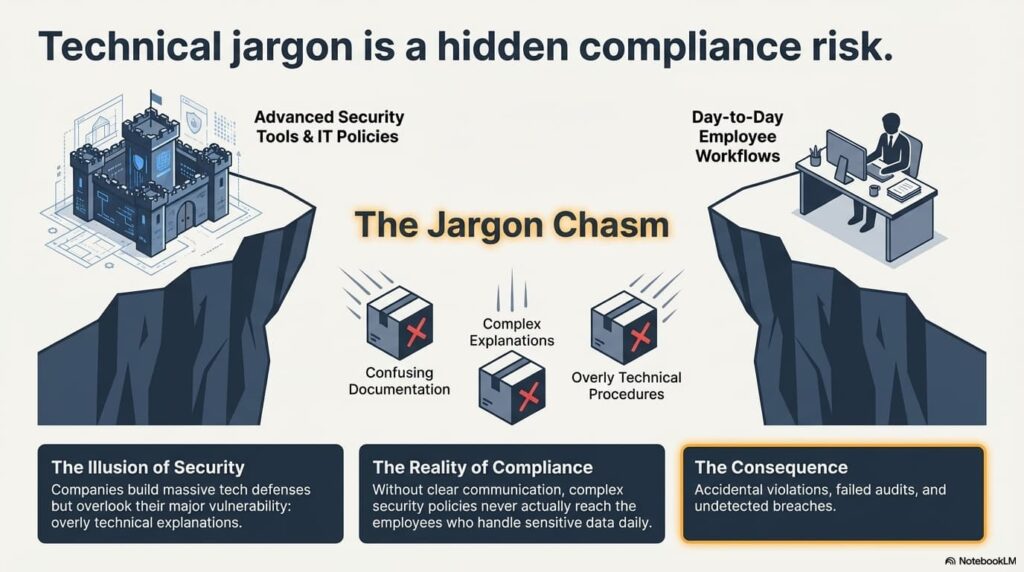
The Hidden Compliance Risk: Technical Jargon

Technical Jargon

Many organizations invest heavily in cybersecurity tools but overlook a major vulnerability: communication.

Complex security policies, confusing documentation, and overly technical explanations can make it difficult for employees to follow compliance requirements correctly.

When staff members don’t fully understand policies around data protection, access controls, or incident reporting, they may unintentionally create compliance risks.

In industries that handle regulated data—such as healthcare, finance, aerospace, or government contracting—this can lead to serious consequences.

Organizations that handle Controlled Unclassified Information (CUI), for example, must follow strict cybersecurity standards such as NIST SP 800-171 and CMMC certification requirements.

These frameworks include extensive security controls covering access management, incident response, encryption, and system monitoring.

If employees cannot understand how these controls affect their day-to-day work, compliance becomes much harder to maintain.

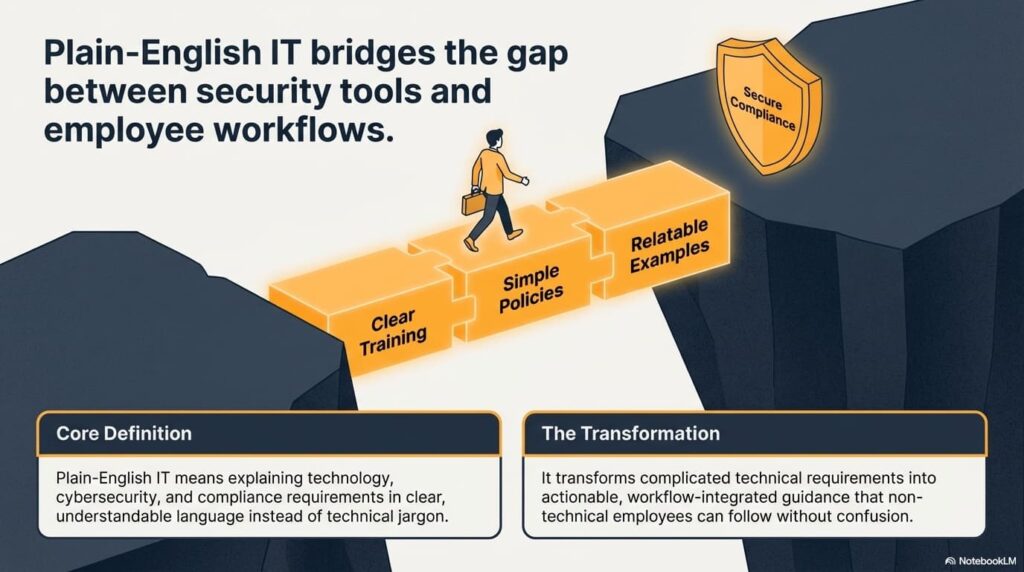
Plain-English IT Bridges the Gap Between Security and Employees

Plain-English IT Bridges the Gap

Plain-English IT transforms complicated technical requirements into clear, actionable guidance employees can follow.

Instead of overwhelming teams with technical terminology, modern IT providers explain security concepts in a way that connects directly to daily workflows.

For example:

Technical policy language:

“Ensure proper authentication and system access controls are maintained.”

Plain-English version:

“Always use multi-factor authentication and never share your login credentials.”

Clear instructions lead to better adoption and fewer mistakes.

Why Simplicity Strengthens Compliance

When IT guidance is easy to understand, organizations benefit in several ways:

• Employees follow security procedures more consistently

• Staff report suspicious activity faster

• Compliance training becomes easier to retain

• Audit documentation becomes clearer and easier to maintain

In 2026, strong cybersecurity isn’t just about technology—it’s about communication.

Compliance Frameworks Are Becoming More Complex

Regulatory frameworks continue to evolve as cyber threats grow more sophisticated.

Government contractors and organizations handling sensitive federal data must meet a wide range of cybersecurity requirements, including:

• NIST SP 800-171 security controls

• CMMC certification requirements for defense contractors

• FAR cybersecurity clauses

• DFARS regulations for DoD contractors

These standards require organizations to maintain strict access controls, monitor systems, encrypt sensitive data, and respond quickly to security incidents.

Without clear explanations and guidance, many employees struggle to understand their role in maintaining compliance.

Compliance Is a Team Effort

IT teams cannot achieve compliance alone.

Every employee who handles sensitive information plays a role in protecting data and maintaining security.

Plain-English IT ensures everyone understands:

• How to recognize phishing attempts

• How to protect sensitive files

• When to report suspicious activity

• Why security procedures exist

When employees understand the “why,” they are far more likely to follow the rules.

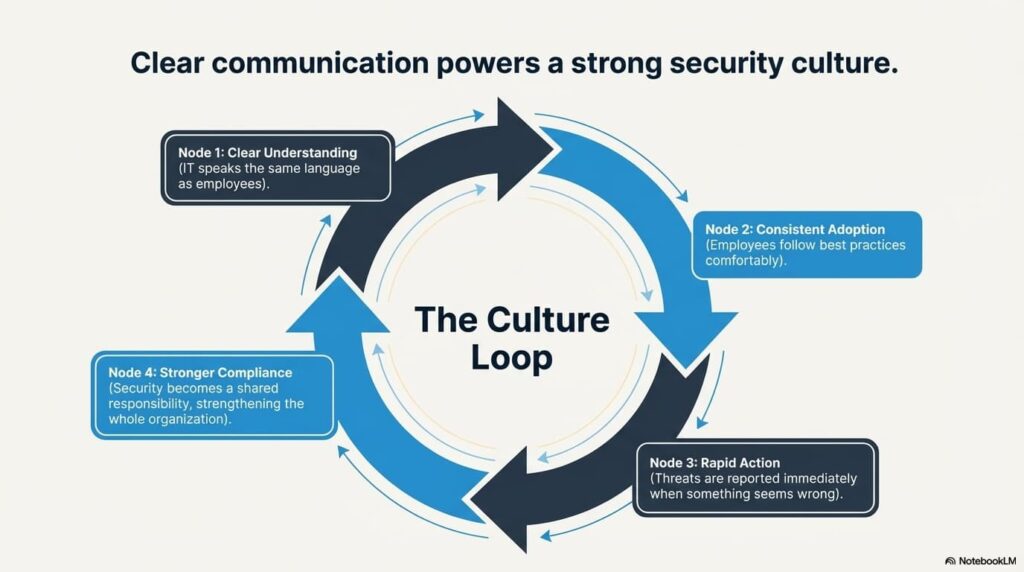
How Plain-English IT Improves Security Culture

How Plain-English IT Improves Security Culture

One of the biggest cybersecurity improvements organizations can make is strengthening their internal security culture.

A strong security culture means employees:

• Feel comfortable reporting potential threats

• Understand the importance of security policies

• Follow best practices consistently

• Act quickly when something seems wrong

Clear communication is the foundation of this culture.

When IT teams speak the same language as employees, security becomes a shared responsibility rather than a confusing set of rules.

Why Businesses Trust HD Tech for Clear, Practical IT Guidance

HD Tech believes IT support should empower businesses, not confuse them.

Based in Orange County, California and serving businesses across the United States, HD Tech focuses on delivering IT support and cybersecurity guidance in clear, practical language that business leaders and employees can understand.

Organizations working with HD Tech benefit from:

• Straightforward IT support without unnecessary jargon

• Clear security guidance for employees

• Practical cybersecurity recommendations

• Assistance navigating complex compliance frameworks

• Responsive help desk support when issues arise

The goal is to make technology easier to manage while strengthening security and compliance across the organization.

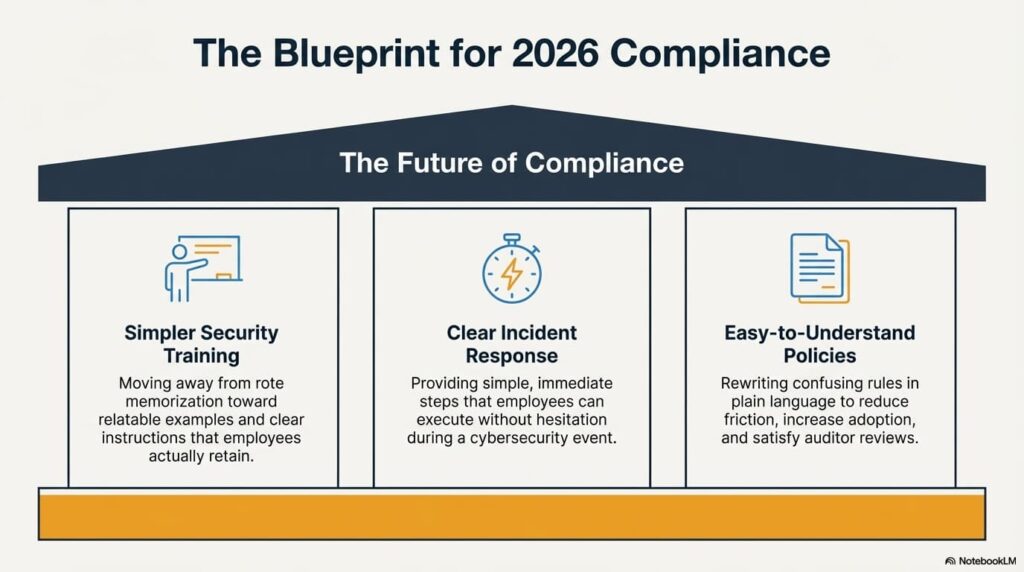
The Future of Compliance: Clear Communication

The Future of Compliance

As cybersecurity regulations evolve, businesses will continue facing more complex compliance requirements.

Organizations that succeed will focus on:

Simpler Security Training

Employees retain information better when training uses relatable examples and clear instructions.

Clear Incident Response Procedures

During a cybersecurity incident, employees need simple steps they can follow immediately.

Easy-to-Understand Policies

Policies written in plain language reduce confusion and increase adoption.

The future of compliance isn’t just stronger technology—it’s clearer communication.

Frequently Asked Questions About Plain-English IT and Compliance

What is plain-English IT?

Plain-English IT refers to explaining technical systems, cybersecurity requirements, and IT policies in simple, understandable language. Instead of using complex terminology, IT teams communicate clearly so employees and business leaders can understand and follow important security and compliance procedures.

Why is communication important for cybersecurity compliance?

Compliance frameworks require organizations to follow strict policies around data protection, system access, monitoring, and incident response. If employees don’t fully understand these policies, they may accidentally violate them. Clear communication ensures everyone understands their responsibilities and helps organizations maintain consistent compliance.

How does plain-English IT help employees recognize cyber threats?

When security training uses clear examples and simple explanations, employees are better able to identify phishing emails, suspicious login activity, and other cyber threats. This awareness helps prevent attacks before they cause damage.

Can better communication help during cybersecurity audits?

Yes. Auditors often review documentation, policies, and employee understanding of security procedures. When policies and procedures are written clearly, organizations can demonstrate that their teams understand and follow compliance requirements.

Is plain-English IT only useful for technical teams?

Not at all. In fact, plain-English IT is most valuable for non-technical employees who interact with technology daily but may not have specialized IT knowledge. Clear communication helps everyone in the organization contribute to security and compliance.

Simplify IT and Strengthen Compliance with HD Tech

Cybersecurity and compliance requirements are becoming more complex every year. Businesses need clear guidance they can trust—not confusing technical jargon.

HD Tech helps organizations navigate modern IT challenges with straightforward support, practical security guidance, and responsive help desk services.

If your business wants IT support that focuses on clarity, security, and reliability, the HD Tech team is ready to help.

Call 877-540-1684 to speak with an IT specialist and learn how clear, practical IT support can strengthen your organization’s security and compliance.

Areas ServedHD Tech is headquartered in Orange County, California, supporting businesses throughout communities such as Irvine, Anaheim, Santa Ana, Newport Beach, and Huntington Beach while providing IT and cybersecurity services nationwide across the United States.

The post Why Plain-English IT Is a Compliance Advantage in 2026 first appeared on HD Tech.


source https://hdtech.com/why-plain-english-it-is-a-compliance-advantage-in-2026/

Tuesday, March 17, 2026

The Evolution of Help Desk Support in 2026: What’s New, What’s Next

What does modern help desk support look like in 2026?

Help desk support in 2026 has evolved far beyond basic password resets and troubleshooting. Today’s IT help desk services combine automation, cybersecurity monitoring, remote support, and proactive system management to keep businesses running smoothly. Instead of waiting for problems to occur, modern help desks prevent issues before they disrupt productivity.

Why are businesses outsourcing IT help desk services?

Many organizations now rely on outsourced help desk support because it provides access to experienced technicians, faster response times, and 24/7 availability without building an internal IT department. This allows teams to focus on business growth while technology experts handle technical issues.

What should companies expect from a next-generation help desk?

Businesses should expect proactive monitoring, rapid ticket response, secure remote support, and integration with cybersecurity and cloud systems. The help desk is no longer just support—it’s a strategic part of modern IT operations.

How Help Desk Support Has Changed Over the Last Decade

IT Evolution - Help Desk Support Over the Decade

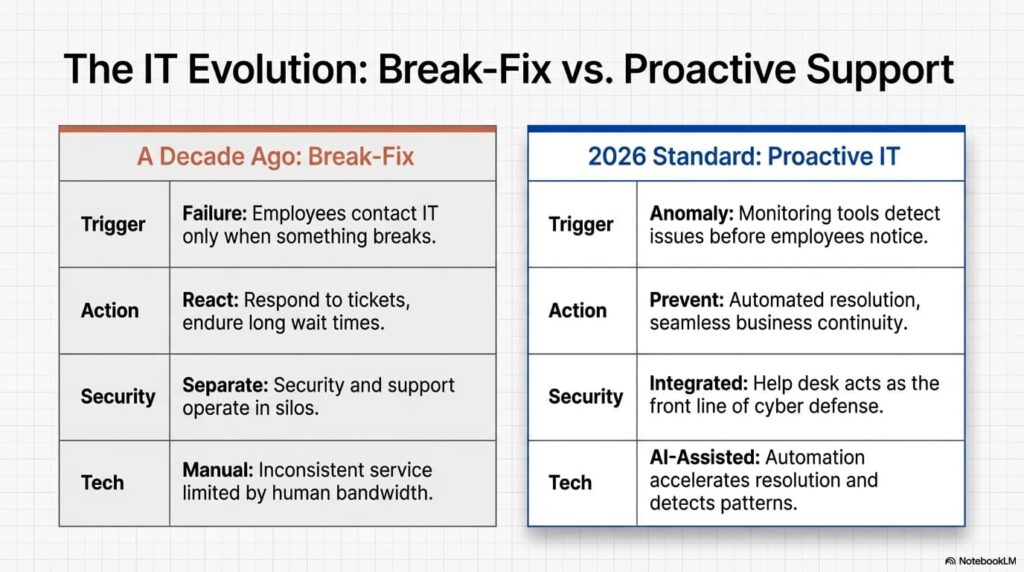
A decade ago, most help desks were reactive. Employees contacted IT only when something broke. Long wait times, limited support hours, and inconsistent service were common.

Today’s help desk environment is dramatically different.

Modern IT help desk services focus on prevention, automation, and business continuity. Instead of reacting to problems, technicians monitor systems, identify vulnerabilities, and resolve issues before they affect operations.

For businesses across Orange County and throughout the United States, this shift has transformed IT support from a cost center into a productivity engine.

From Break-Fix to Proactive IT Support

Traditional IT support followed a simple cycle:

A problem occurred → a ticket was created → IT responded.

In 2026, proactive monitoring tools detect issues before employees even notice them.

Examples include:

• Automated patch management to close security gaps

• System monitoring to detect hardware or network failures early

• Security alerts identifying suspicious login activity

• Cloud monitoring to prevent downtime

This proactive approach reduces downtime and keeps teams working without interruption.

The Rise of AI-Enhanced Help Desk Services

AI-Enhanced Help Desk Services

Artificial intelligence has become a powerful addition to modern help desk environments.

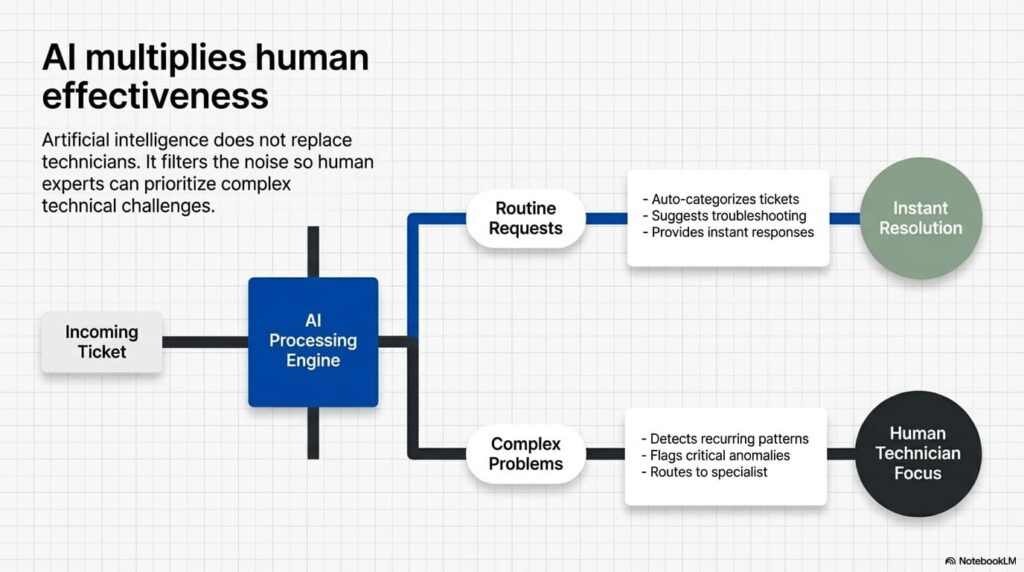
AI tools help support teams resolve common issues faster and prioritize complex technical problems for human technicians.

How AI Improves Help Desk Efficiency

Modern help desk platforms use AI to:

• Automatically categorize support tickets

• Suggest troubleshooting steps to technicians

• Provide instant responses for common user questions

• Detect patterns that indicate recurring system issues

This doesn’t replace technicians—it makes them more effective.

At HD Tech, AI tools allow support teams to focus on solving complex technical challenges while routine requests are resolved quickly.

Remote Support Has Become the Standard

The modern workplace is more distributed than ever. Employees work from offices, homes, and remote locations across the country.

Because of this, remote IT support has become essential.

Help desk technicians can now securely access devices, troubleshoot issues, deploy updates, and configure systems without needing to be physically present.

Benefits of remote help desk support include:

• Faster problem resolution

• Reduced downtime for employees

• Immediate support regardless of location

• Consistent service across multiple offices

For businesses in Orange County and nationwide, remote support ensures employees stay productive wherever they work.

Cybersecurity Is Now Built Into Help Desk Support

One of the biggest changes in help desk operations is the integration of cybersecurity.

In the past, security and support were separate departments. Today they work together.

Help desk teams now play a critical role in protecting organizations from cyber threats by identifying suspicious activity and responding quickly.

Security Responsibilities of a Modern Help Desk

Help desk technicians now assist with:

• Multi-factor authentication support

• Suspicious login detection

• Phishing incident reporting

• Endpoint protection monitoring

• Secure access management

Because many cyber incidents start with user devices, the help desk has become the front line of cybersecurity defense.

Why Businesses Are Choosing Managed Help Desk Services

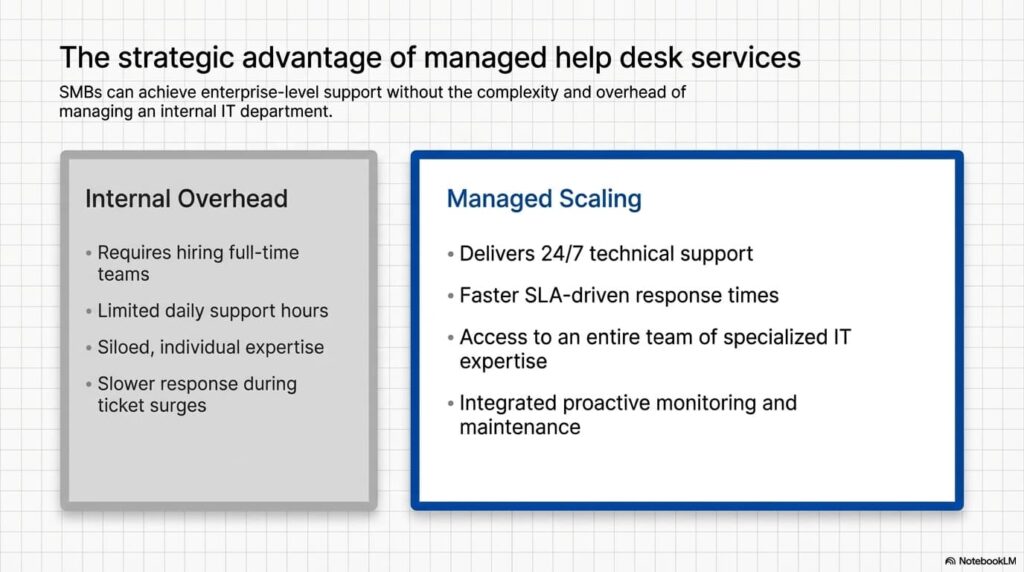
More companies are turning to managed IT providers for help desk support because it delivers consistent service, advanced tools, and experienced technicians without hiring an internal team.

Managed help desk services offer:

• 24/7 technical support

• Faster response times

• Access to specialized IT expertise

• Proactive monitoring and maintenance

• Improved cybersecurity integration

For small and mid-sized businesses, this approach provides enterprise-level support without the complexity of managing IT internally.

Managed Help Desk Services

Why Businesses Trust HD Tech for Help Desk Support

HD Tech provides modern help desk support designed for businesses that depend on reliable technology.

Based in Orange County, California and serving businesses across the United States, HD Tech focuses on proactive support, security awareness, and rapid response to technical issues.

Organizations choose HD Tech because they benefit from:

• Responsive help desk technicians

• Proactive system monitoring

• Integrated cybersecurity awareness

• Support for remote and hybrid teams

• Consistent service nationwide

The goal is simple: keep systems running, employees productive, and businesses protected.

What’s Next for Help Desk Support?

Looking ahead, help desk support will continue evolving as technology advances.

Future trends include:

Predictive IT Support

Advanced monitoring systems will predict potential hardware failures or network issues before they occur.

Automation of Routine Tasks

Routine requests like password resets, software installations, and system updates will become increasingly automated.

Deeper Cybersecurity Integration

Help desks will continue working closely with security teams to detect threats faster and protect business data.

Improved User Experience

The future help desk will focus on reducing friction for employees through faster response times, smarter automation, and better communication.

Frequently Asked Questions About IT Help Desk Support

What does an IT help desk actually do?

An IT help desk provides technical support for employees and systems within an organization. This includes troubleshooting software problems, assisting with login issues, configuring devices, and maintaining network connectivity. Modern help desks also monitor systems proactively and support cybersecurity efforts to prevent disruptions.

Is outsourced help desk support reliable?

Yes, outsourced help desk services are often more reliable than internal support teams because they provide access to multiple specialists and extended support hours. Managed providers also use advanced monitoring and ticketing systems to ensure faster response times and consistent service quality.

Can help desk services support remote employees?

Absolutely. Modern help desk teams use secure remote support tools to troubleshoot devices, install updates, and resolve technical issues regardless of where employees are located. This makes it possible to support hybrid and fully remote work environments.

How quickly should a help desk respond to support tickets?

Response times depend on the severity of the issue. Critical issues affecting business operations should receive immediate attention, while lower-priority requests may be handled through a ticket queue. Managed help desk providers often use service level agreements to ensure timely responses.

How does help desk support improve business productivity?

A well-managed help desk reduces downtime by resolving technical issues quickly and preventing recurring problems. Employees spend less time dealing with technology frustrations and more time focusing on their work, which improves overall efficiency.

Keep Your Business Running with Reliable Help Desk Support

Technology problems can slow down teams, disrupt operations, and create unnecessary stress for employees. A modern help desk ensures your systems stay stable and your staff receives fast, reliable support when they need it.

If your organization is ready for proactive, responsive IT support, the team at HD Tech is here to help.

Call 877-540-1684 to speak with a help desk specialist and learn how modern IT support can keep your business running smoothly.

Areas Served

HD Tech is headquartered in Orange County, California, supporting businesses across communities such as Irvine, Anaheim, Santa Ana, Huntington Beach, and Newport Beach, while providing nationwide IT help desk support throughout the United States.

The post The Evolution of Help Desk Support in 2026: What’s New, What’s Next first appeared on HD Tech.


source https://hdtech.com/the-evolution-of-help-desk-support-in-2026-whats-new-whats-next/

Monday, March 16, 2026

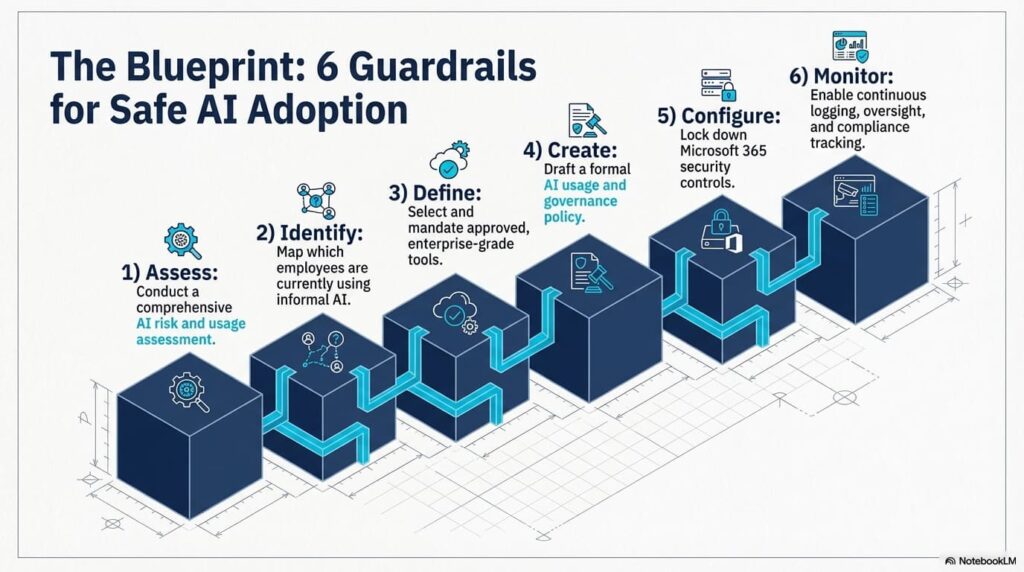
Your Employees Are Already Using AI: How to Secure AI Adoption in Your Business

Are employees already using AI without approval?

Yes. In most organizations, employees are already using tools like ChatGPT, Copilot, Claude, or Gemini for emails, document summaries, research, and data analysis — often without formal oversight or policy.

Is employee AI usage a cybersecurity risk?

It can be. When staff paste confidential contracts, financial data, HR records, or proposal content into public AI tools, it may create compliance violations, data leakage, and contractual liability.

What’s the first step to control AI use in my company?

Start with an AI usage assessment and implement a formal AI usage policy before enabling enterprise AI tools like Microsoft Copilot.

The AI Reality in Today’s Workplace

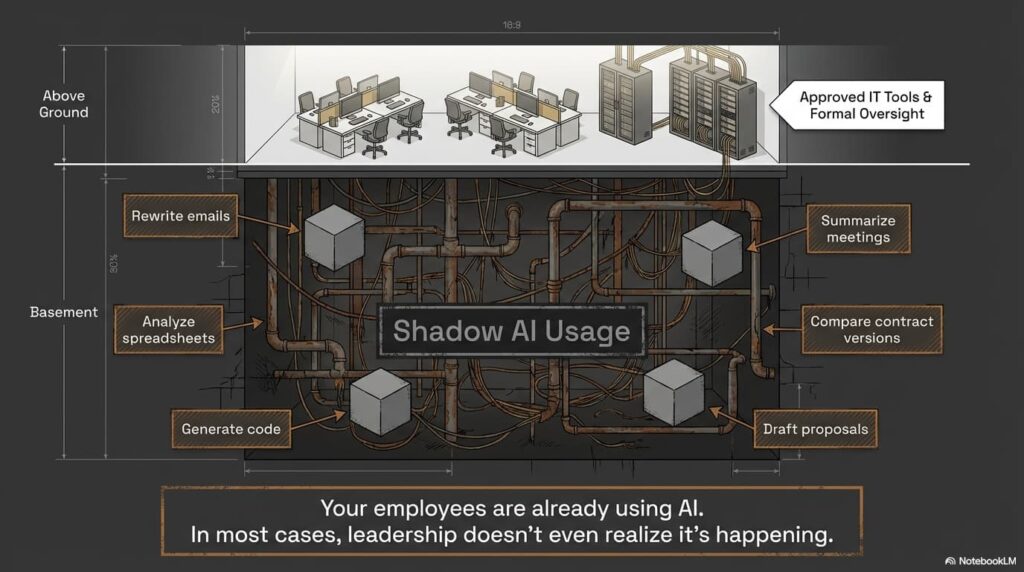
AI is quietly becoming part of daily workflows across industries.

Employees are using AI to:

  • Rewrite emails to sound more professional
  • Summarize meetings
  • Analyze spreadsheets
  • Compare contract versions
  • Generate code
  • Draft proposals

In many cases, leadership doesn’t even realize it’s happening.

And that’s the risk.

AI Reality

Why Uncontrolled AI Usage Is a Business Liability

When AI tools are used informally, companies lose visibility into:

  • What data is being shared
  • Where that data is stored
  • Whether it is used to train public models
  • Who has access to the output

Uncontrolled AI usage can lead to:

  • Confidentiality breaches
  • Regulatory violations
  • Loss of competitive advantage
  • Reputational damage

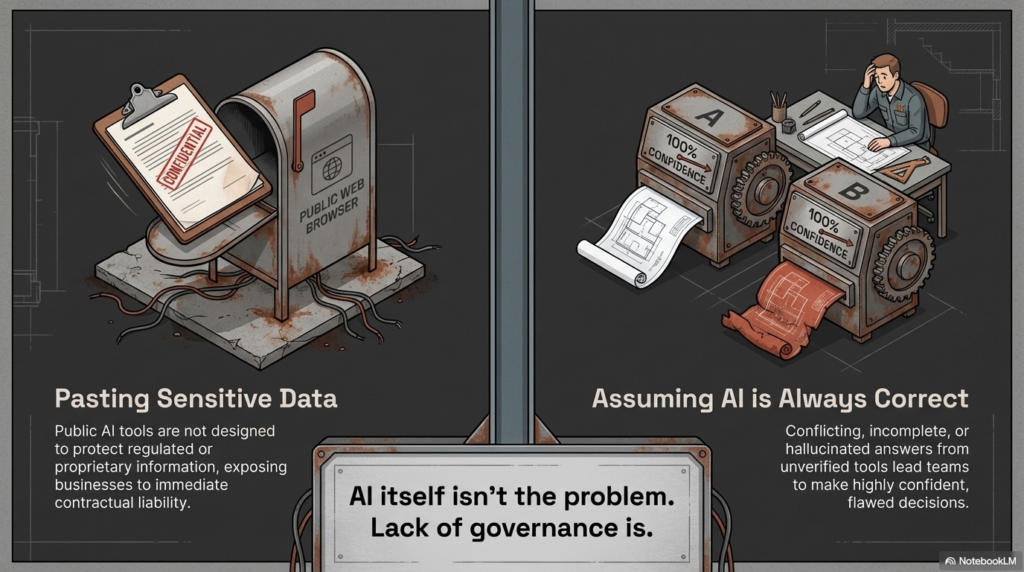
AI itself isn’t the problem.

Lack of governance is.

The Most Common AI Risks We See

Pasting Sensitive Data into Public AI Tools

Employees often copy and paste:

  • Client contracts
  • Financial statements
  • HR documentation
  • Engineering specifications
  • Proposal language

Public AI tools are not designed to protect regulated or proprietary information.

Assuming AI Is Always Correct

AI platforms can generate authoritative-sounding responses that are incomplete or incorrect.

We’ve seen situations where:

  • One AI tool gives one answer
  • Another tool gives a conflicting answer
  • Both sound confident

Without verification, teams can make flawed decisions.

No Policy, No Guardrails

Many organizations operate with:

  • No written AI policy
  • No approved AI tool list
  • No monitoring
  • No logging

That creates inconsistent, risky usage across departments.

Most Common AI Risks

What Secure AI Adoption Looks Like

AI can absolutely improve productivity.

But it must follow a structured framework.

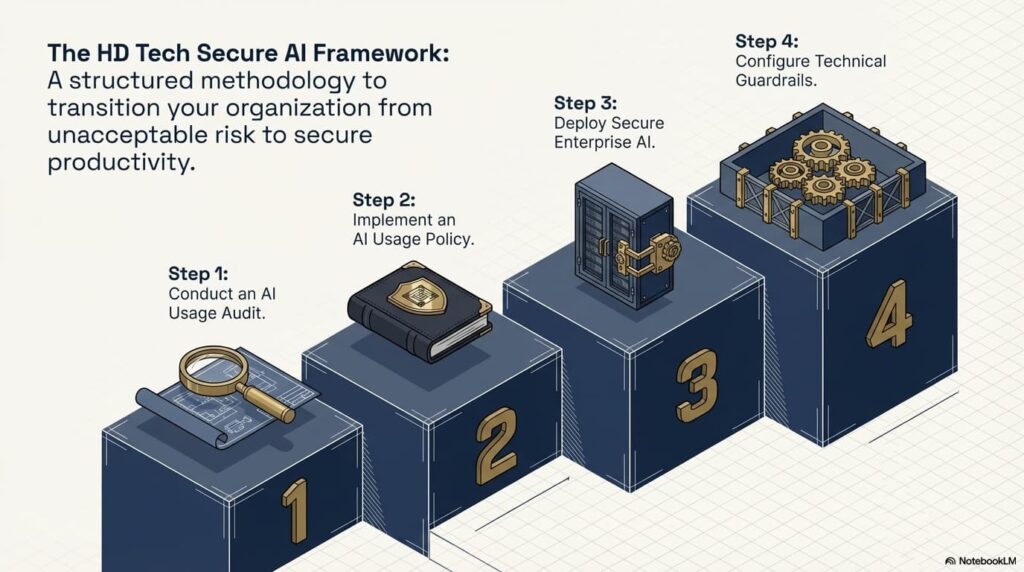
Step 1: Conduct an AI Usage Audit

Identify:

  • Which AI tools employees are currently using
  • What types of data are being entered
  • Whether enterprise AI licenses are already in place

You can’t control what you can’t see.

Step 2: Implement an AI Usage Policy

Your policy should clearly define:

  • Approved and prohibited AI tools
  • What data can and cannot be entered
  • Required authentication standards
  • Review and oversight procedures
  • Incident reporting protocols

This protects both leadership and staff.

Step 3: Deploy Secure Enterprise AI

For Microsoft-based businesses, Copilot offers:

  • Tenant-level data protection
  • No public training on your work data
  • Identity-based access control
  • Administrative oversight
  • Logging and monitoring capabilities

This allows AI productivity without exposing confidential information.

Step 4: Configure Technical Guardrails

Inside Microsoft 365, you can:

  • Restrict data sharing
  • Enforce multi-factor authentication
  • Enable audit logging
  • Apply data loss prevention policies
  • Segment access based on role

Technology must reinforce policy.

What Secure AI Adoption Looks Like

How We Use AI Inside Managed IT & Security Operations

As a Managed Service Provider and cybersecurity partner, we use AI every day — but never without oversight.

We leverage AI to:

  • Monitor endpoints and servers for anomalies
  • Flag suspicious activity for human review
  • Summarize internal meetings
  • Streamline help desk documentation
  • Assist with coding and automation
  • Analyze ticket trends and performance data

But every AI-generated alert is reviewed by real professionals.

AI assists. Humans validate.

That’s the model every organization should follow.

Industries at Higher AI Compliance Risk

If your business operates in:

  • Defense Contracting
  • Law
  • Accounting
  • Healthcare
  • Construction
  • Manufacturing
  • Professional Services

You likely handle:

  • Sensitive client data
  • Regulated information
  • Proprietary intellectual property

The longer AI usage remains informal, the greater the risk becomes.

Why Choose HD Tech for Secure AI Deployment?

HD Tech delivers comprehensive managed IT services and cybersecurity for growing businesses nationwide. We are based in Orange County, California, and support organizations across the United States.

Since 1996, we’ve protected over 100 companies across defense, law, construction, accounting, manufacturing, and professional services.

We provide:

  • 24/7 IT monitoring
  • Rapid incident response
  • Enterprise-grade cybersecurity
  • Secure Microsoft 365 configuration
  • Copilot deployment and governance
  • AI usage policy development
  • Ongoing monitoring and compliance alignment

We don’t just enable AI tools.

We secure them, monitor them, and align them with your business risk profile.

Frequently Asked Questions About AI Security

Should we block all public AI tools in our company?

Not necessarily. Some businesses restrict public AI tools entirely, while others allow limited use for non-sensitive tasks. The key is defining clear boundaries and enforcing them through policy and technical controls.

How do I know if employees are already using AI?

Review browser logs, SaaS usage reports, and workflow patterns. A structured AI risk assessment can reveal shadow usage across departments.

Is Microsoft Copilot completely risk-free?

No technology is risk-free. However, when properly configured within your Microsoft tenant, Copilot significantly reduces the risks associated with public AI platforms.

Can AI help improve cybersecurity?

Yes. AI-assisted monitoring can detect anomalies faster and surface potential threats for human review. However, AI should augment — not replace — skilled analysts.

What industries face the highest AI compliance risk?

Defense contractors, law firms, CPA firms, healthcare organizations, and financial services firms face heightened exposure due to regulatory and confidentiality obligations.

Ready to Take Control of AI in Your Business?

AI is already inside your organization.

The only question is whether it’s governed — or unmanaged.

HD Tech provides comprehensive managed IT services and cybersecurity for growing businesses nationwide. Based in Orange County, California, we deliver 24/7 monitoring, rapid incident response, and enterprise-grade cybersecurity.

If you want to implement AI guardrails before it becomes a security incident,

Call HD Tech today at 877-540-1684.

Secure your AI strategy before it creates unnecessary risk.

The post Your Employees Are Already Using AI: How to Secure AI Adoption in Your Business first appeared on HD Tech.


source https://hdtech.com/your-employees-are-already-using-ai-how-to-secure-ai-adoption-in-your-business/

Thursday, March 12, 2026

How Construction Companies Are Using AI to Analyze RFPs, Proposals & ERP Data

Can construction companies safely use AI for RFPs and proposals?

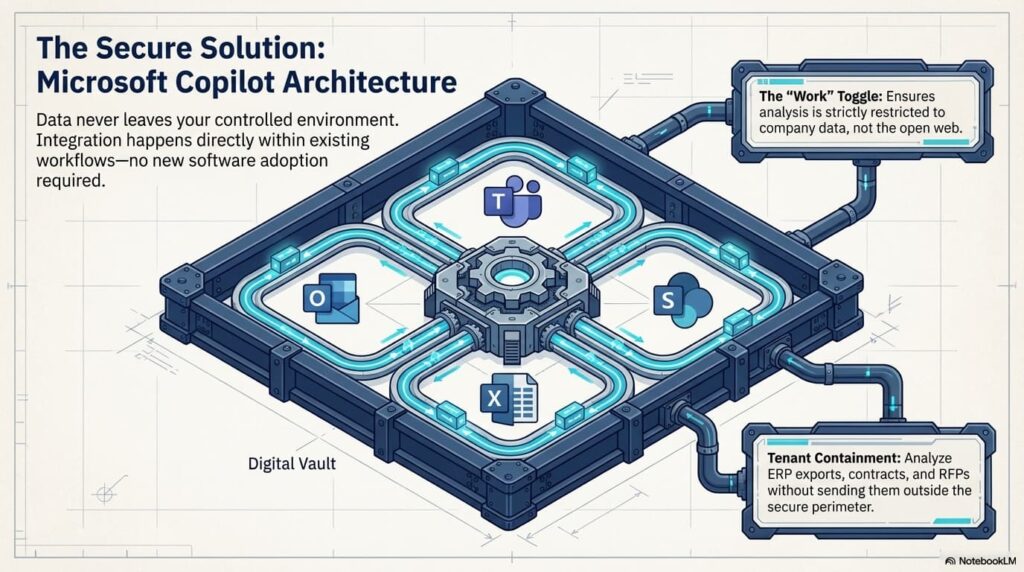
Yes — when AI tools like Microsoft Copilot are deployed inside a secure Microsoft 365 tenant and governed by clear usage policies. Public AI tools should never be used for confidential bid data, financials, or proprietary project details.

How does AI help construction firms win more bids?

AI can compare past proposals to new RFPs, identify reusable language, highlight compliance gaps, and reduce turnaround time — giving contractors a competitive edge without increasing administrative overhead.

Is it safe to upload ERP or project data into AI tools?

Only if the AI operates inside your secured work environment (such as Copilot within Microsoft 365). Uploading ERP exports or project files into public AI platforms creates unnecessary security and contractual risk.

Why Construction Firms Nationwide Are Turning to AI

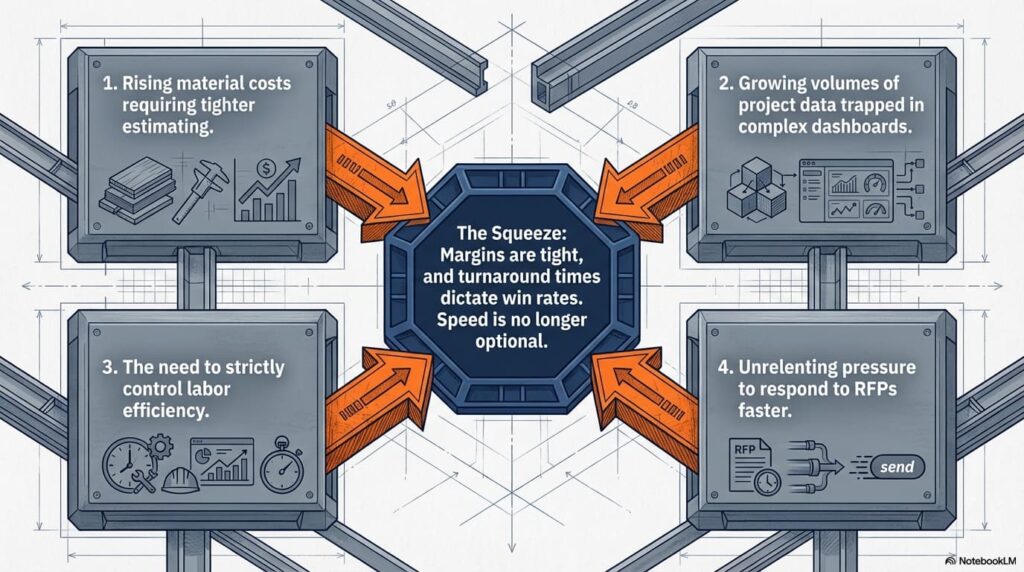
Construction companies across the U.S. are under pressure to:

  • Respond to RFPs faster
  • Improve bid accuracy
  • Manage rising material costs
  • Control labor efficiency
  • Analyze growing volumes of project data

AI is becoming a competitive advantage in a highly competitive industry where margins are tight and turnaround time matters.

But speed without security introduces risk.

Why Construction Firms Nationwide Are Turning to AI

AI for RFP & Proposal Analysis: A Competitive Edge in Bidding

Comparing Past Proposals to New RFPs

Construction firms accumulate years of proposal data. AI can:

  • Compare historical bids to new RFP requirements
  • Identify reusable scope language
  • Highlight missing compliance elements
  • Flag discrepancies in insurance or safety documentation

Instead of manually reviewing hundreds of pages, estimators can focus on pricing strategy and differentiation.

Reducing Proposal Creation Time

AI helps teams:

  • Draft structured outlines
  • Reformat technical responses
  • Summarize compliance requirements
  • Standardize formatting across submissions

In competitive municipal and commercial bidding environments, shaving days off proposal timelines can directly impact win rates.

However, proposal documents often include:

  • Pricing structures
  • Subcontractor details
  • Proprietary methodologies
  • Insurance documentation

This data must remain inside a secure tenant.

Using AI for ERP & Project Data Analysis

Many construction companies struggle to extract meaningful insights from their ERP systems.

Copilot inside Excel can help you:

  • Identify recurring service ticket types
  • Analyze job costing trends
  • Compare project profitability
  • Detect material cost fluctuations
  • Aggregate multi-source data

Instead of navigating complex dashboards, leadership can ask direct questions and receive structured summaries.

Improved visibility into operational trends strengthens forecasting and decision-making.

The Security Risk Construction Companies Overlook

Many project managers and estimators are already using AI informally.

Common risky behaviors include:

  • Pasting RFP content into public AI chat tools
  • Uploading subcontractor agreements for analysis
  • Sharing financial data to generate summaries
  • Entering HR or labor data for review

Even if intentions are good, this creates:

  • Contractual risk
  • Confidentiality exposure
  • Potential liability

NDAs, subcontractor agreements, and bid confidentiality clauses often prohibit external data sharing. Public AI platforms were not designed to protect that data.

Why Microsoft Copilot Is the Preferred AI Platform for Construction Firms

For construction companies already using Microsoft 365, Copilot offers:

  • Data contained within your tenant
  • Identity-based access controls
  • No public training on your work data
  • Administrative oversight
  • Integration with Outlook, Teams, Excel, and SharePoint

This allows firms to analyze ERP exports, contracts, and RFP documents without sending them outside their controlled environment.

Using the “Work” data toggle ensures analysis is restricted to company data — not the open web.

Microsoft Copilot Is the Preferred AI Platform for Construction Firms

Implementing AI Guardrails in Your Construction Company

Before enabling AI broadly, construction firms should:

  1. Conduct an AI usage assessment
  2. Identify which employees are already using AI
  3. Define approved AI tools
  4. Create a formal AI usage policy
  5. Configure Microsoft 365 security controls
  6. Enable logging and monitoring

AI is powerful. But without guardrails, it becomes unpredictable and risky.

AI Guardrails

Why Choose HD Tech for Secure AI Deployment?

HD Tech provides comprehensive managed IT services and cybersecurity for growing businesses nationwide. We are based in Orange County, California, and support construction companies across the United States.

Since 1996, we’ve protected over 100 companies across construction, defense, law, accounting, manufacturing, and professional services.

We provide:

  • 24/7 IT monitoring
  • Rapid incident response
  • Secure Microsoft 365 and Copilot deployment
  • AI governance policy development
  • Cybersecurity protection for project data
  • Ongoing compliance and risk monitoring

AI should help you win projects — not create exposure that jeopardizes them.

As one operations leader shared, “AI helped us streamline proposals, but HD Tech made sure we weren’t exposing sensitive information.”

Frequently Asked Questions About AI in Construction

Can AI help with estimating accuracy?

Yes. AI can assist in reviewing historical project data, identifying cost patterns, and comparing material trends. However, final estimates should always be validated by experienced estimators.

Is it safe to upload blueprints into AI?

Blueprints often contain proprietary and contractual information. They should only be analyzed within a secure, enterprise-controlled AI environment — not public AI platforms.

How can AI improve project management?

AI can summarize meeting notes, track communication threads, analyze ticket trends, and surface recurring operational issues, helping project managers focus on execution.

Do smaller construction firms need an AI policy?

Yes. Even small firms handling municipal or commercial projects are bound by confidentiality clauses. An AI usage policy protects against accidental data exposure.

What’s the first step to secure AI adoption in construction?

Begin with an AI risk assessment to determine how your team is currently using AI and whether your Microsoft environment is configured securely.

Ready to Use AI to Win More Bids — Without Creating Risk?

AI can accelerate proposals, improve data visibility, and enhance operational efficiency.

But it must be implemented securely.

HD Tech delivers comprehensive managed IT services and cybersecurity for organizations nationwide. Based in Orange County, California, we provide 24/7 monitoring, rapid incident response, and enterprise-grade cybersecurity.

If you’re ready to implement AI securely inside your construction business,

Call HD Tech at 877-540-1684.

Let’s build your competitive advantage — safely.

The post How Construction Companies Are Using AI to Analyze RFPs, Proposals & ERP Data first appeared on HD Tech.


source https://hdtech.com/how-construction-companies-are-using-ai-to-analyze-rfps-proposals-erp-data/

2026 Cloud Security Checklist for Regulated SMBs

What cloud security steps should regulated SMBs follow in 2026? Regulated small and mid-sized businesses must secure cloud systems with str...